
Digital badges and micro-credentials, signed to Open Badges 3.0
Give learners a digitally signed Open Badges 3.0 credential alongside the PDF certificate. They add it to LinkedIn, and employers verify it in one click on a public page, with no login and no phone call to you.
Each credential is signed with your organisation's key, so anyone can check who issued it, what it recognises and whether it is still valid.
- Add to LinkedIn in one click
- Public verification page
- Expiry, renewal and revocation
What are digital badges?
A digital badge is a verifiable online record of a skill or achievement that a learner can share and anyone can check. Continuum Learn issues them as digitally signed Open Badges 3.0 credentials, alongside the PDF certificate, for a course or a whole programme.
Unlike an image, a signed credential carries the details of the award inside it: what it recognises, how it was earned, who issued it and when, locked in with your organisation's digital signature. Continuum creates the signing key for you the first time a credential is issued. You describe the award once on the course or programme, with an achievement type (such as micro-credential, certificate or badge), a description, the criteria, learning outcomes, a level, notional learning hours and skills. Learners who earn the certificate get the credential as well.
What do learners and employers see? Learners get a Share button on their dashboard and results page: add to LinkedIn, copy the verification link, download the badge image or download the signed credential file. Every award has a public verification page showing Valid, Expired or Revoked, the learner's name, the title, the dates, and who issued it and what it recognises. It shows no email address or other personal details.
What is not covered? Credentials are issued for completions on Continuum, alongside a certificate, so a course needs certificates switched on. We have not yet tested importing into every badge wallet, so check the one you rely on. For the certificate side see CPD certificate software and programme certificates, and for the bodies who award them, an LMS for professional bodies.
Step-by-step guide: how to issue verifiable digital badges in Continuum Learn
Credentials are signed, frozen at issue and checkable by anyone with the link
See it in the product
Screens from Continuum Learn, shown with example data.
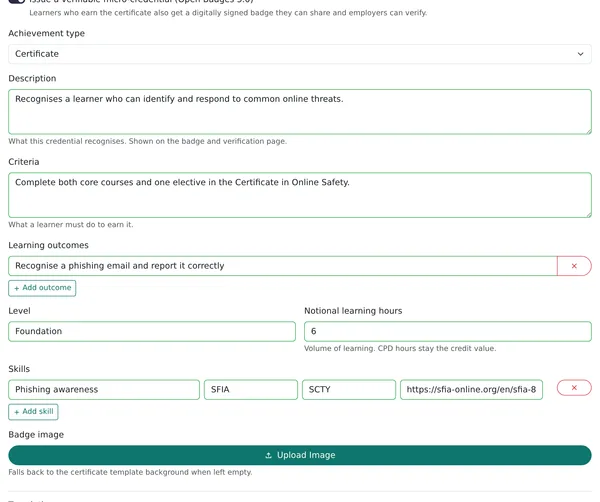
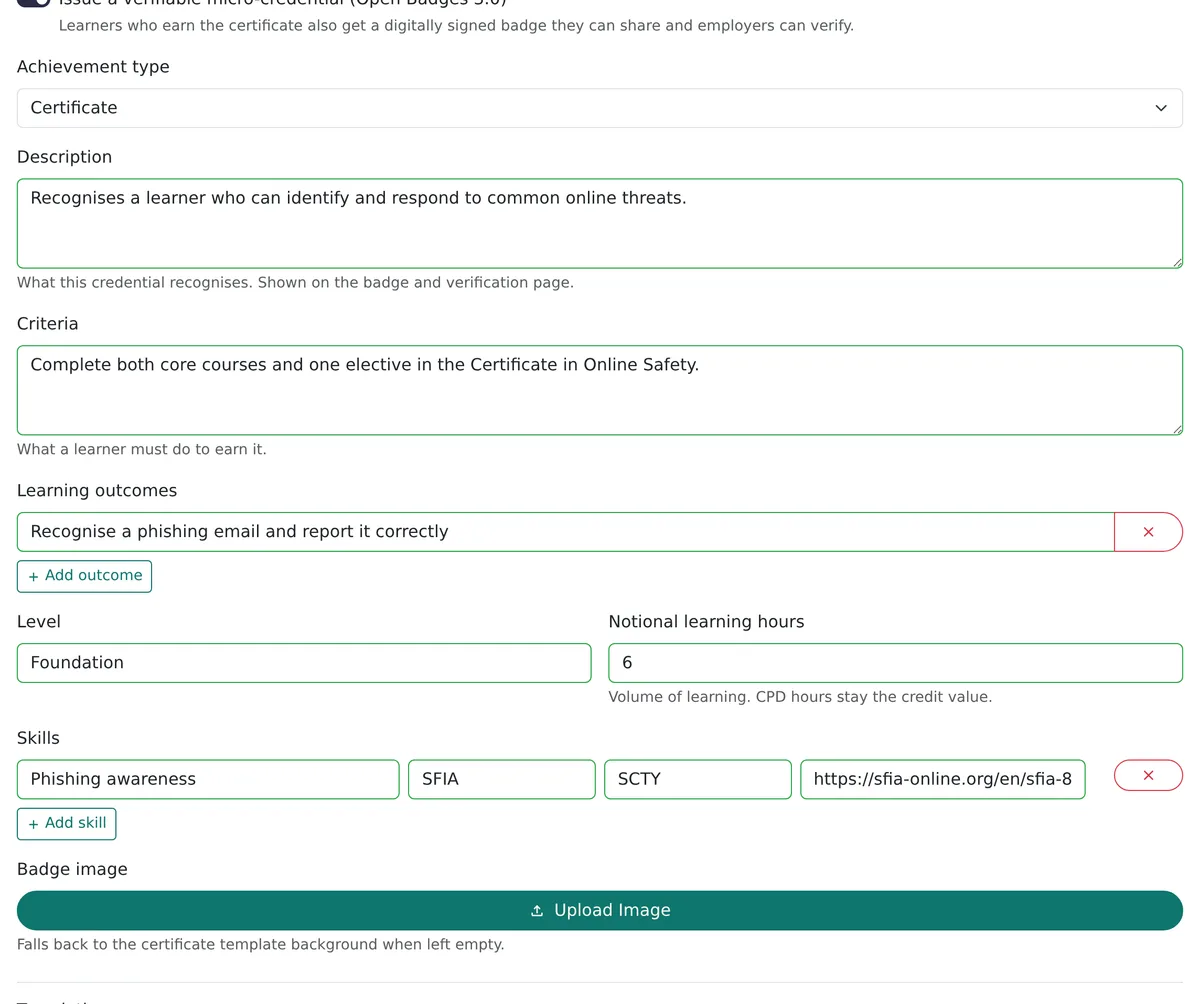
Describe the credential once
Choose the achievement type and write what it recognises, what a learner must do to earn it and the outcomes. Add a level, notional learning hours, skills and your own badge image.
Verified in one click
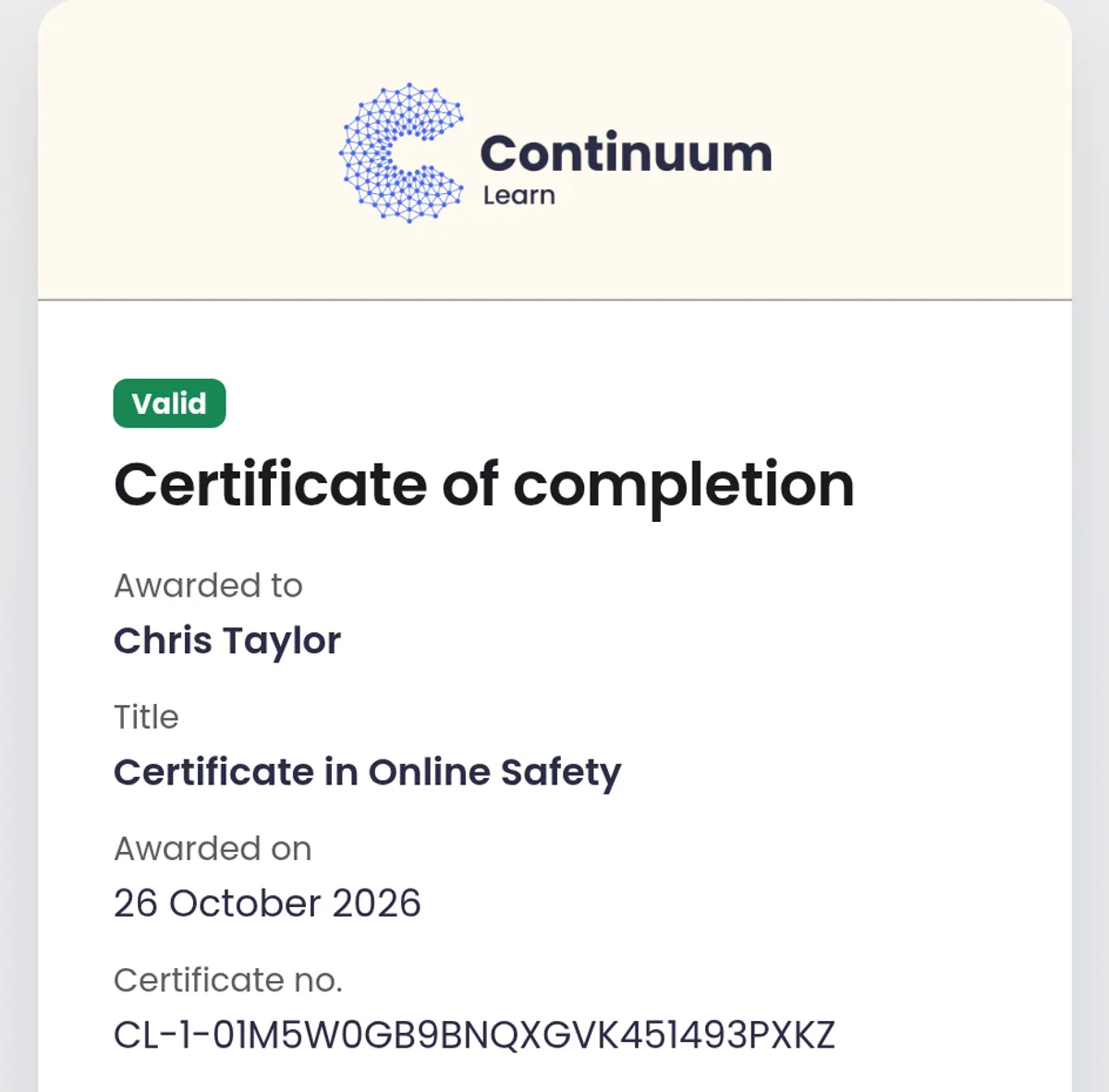
Every credential has a public page showing whether it is Valid, Expired or Revoked, with who it was awarded to, the title, the date and the certificate number.
Your organisation's signing key
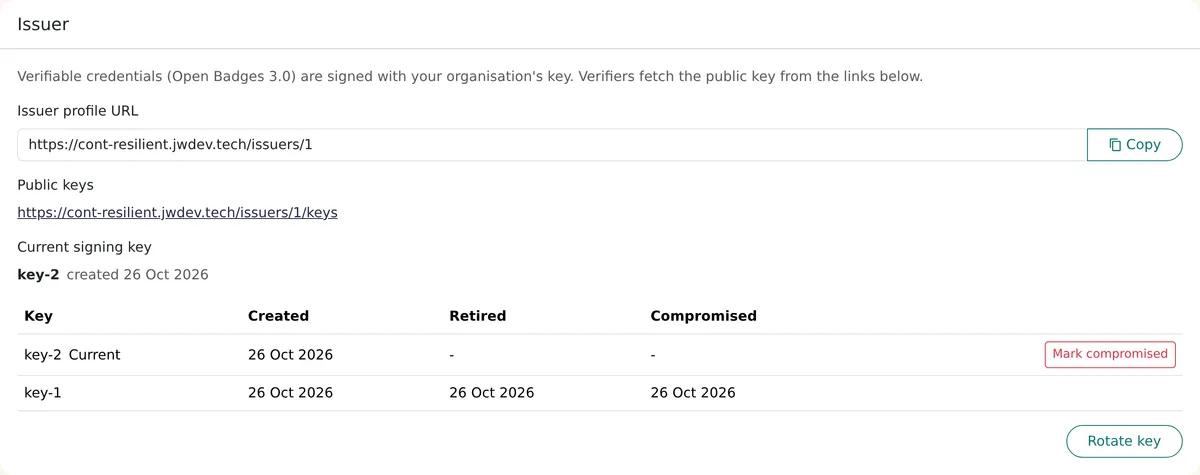
Continuum creates and holds the key that signs your credentials and publishes the public half so verification tools can check them. Rotate it as routine housekeeping and existing credentials keep verifying.
Why issue verifiable digital credentials
Proof that does not depend on someone taking the learner's word for it.
Employers can verify it themselves
A public page confirms the award is genuine, still valid and not revoked, so nobody has to phone or email you.
Learners can share it where it counts
An Add to LinkedIn button opens LinkedIn's add-certification form already filled in with the title, issuer, date and verification link.
Built on an open standard
Credentials follow Open Badges 3.0, so they are not locked to one product. The signed credential file can be downloaded for wallets and systems that accept the standard.
You stay in control
Set an expiry, renew with a re-issue, or revoke an award issued in error. The verification page shows the change straight away.
Who issues digital badges and micro-credentials
Professional bodies and associations
Recognise CPD and short qualifications that members can show on LinkedIn. See an LMS for professional bodies.
Training providers
Add a verifiable badge to every course you sell, with learning outcomes and notional hours employers can read.
Employers
Record compliance and skills training as credentials with an expiry, and renew them when they lapse.
Digital credential features in Continuum Learn
Everything below is in the product today
Open Badges 3.0 credentials
A digitally signed credential for each award, issued for a course or a programme alongside the PDF certificate.
Add to LinkedIn
A Share menu on the learner dashboard and results page: add to LinkedIn, copy the verification link, download the badge or download the credential.
Public verification page
Shows Valid, Expired or Revoked, the award details, the courses a programme includes and what the credential recognises, without exposing personal details.
Stacking into programmes
A programme can contain courses and other programmes, so smaller credentials build into a larger one. See programme certificates.
Expiry and renewal
Set a validity period in months. The credential shows as Expired after that date, learners get a reminder email before it lapses, and a re-issue starts a fresh period.
Revoke or re-issue
Withdraw an award with a recorded reason, or re-issue an updated one. Issued credentials are frozen, so later edits never change them.
Translations
The description, criteria and outcomes can be written per language, so verifiers see them in the learner's language.
Webhook and Credly
Send a signed message to your own system whenever a credential is issued or revoked, or push credentials to Credly with a badge template per credential.
Key management
Rotate the signing key at any time without affecting issued credentials. Mark a key compromised in an emergency and every credential it signed is revoked.
Frequently asked questions
What are digital badges?
A digital badge is a verifiable online record of a skill or achievement that a learner can share and anyone can check. In Continuum Learn it is issued as a digitally signed Open Badges 3.0 credential, so it carries what was achieved, who issued it and when, and its status can be checked on a public verification page.
What is the difference between a certificate and a digital badge?
A certificate is a document to print or file. A digital badge is a credential that can be checked online: it carries the award details and a digital signature, and its status (valid, expired or revoked) can be confirmed by anyone with the link. In Continuum a learner gets both, because the credential is issued alongside the PDF certificate.
How do I add a digital badge to LinkedIn?
In Continuum Learn, the learner opens the Share menu next to their certificate on the dashboard or results page and chooses Add to LinkedIn. LinkedIn's add-certification form opens already filled in with the title, issuer, date and verification link. They review it and save.
How long does it take to get a micro-credential?
That is set by whoever issues it. In Continuum Learn, a micro-credential takes as long as the course or programme you attach it to: the learner earns it when they meet the completion rule. You can record the volume of learning as notional learning hours on the credential.
What is Open Badges 3.0?
Open Badges 3.0 is an open standard for digital credentials, maintained by 1EdTech and built on the W3C Verifiable Credentials model. A credential is digitally signed by the issuer and describes the achievement, so it can be verified without contacting the issuer. Continuum issues credentials in this format.
Do learners need an account anywhere to use their badge?
No. They can copy the verification link or download the badge and credential straight from the Share menu. LinkedIn and badge wallets are optional.
Can a digital credential expire or be withdrawn?
Yes. Set a validity period in months and the credential shows as Expired after that date, with a reminder email to the learner beforehand. An admin can revoke an award with a recorded reason, and the verification page then shows Revoked. To renew, re-issue the award.
Can small credentials build into a bigger one?
Yes. A programme can contain courses and other programmes, so for example a Diploma can require a Foundation and a Practitioner programme. A nested award only counts while it is valid. See programme certificates.
Can we send issued credentials to another system?
Yes. Add a webhook endpoint and a signing secret under Manage settings and Continuum sends a signed message when a credential is issued or revoked. There is also a Credly integration that sends credentials with a badge template you match to each credential.
See a credential issued end to end
Book a demo and we will set up a micro-credential on a live team, then show the learner Share menu and the verification page.